
As-built drawings explained: your essential Florida guide

You thought those blueprints in your contractor’s hands were the final word on your renovation project. Then you discovered changes happened during construction, and suddenly those original plans don’t match what’s actually built. This confusion highlights why as-built drawings matter for every Florida homeowner and business owner tackling construction or renovation work. These critical documents capture the real story of your project, recording every modification, adjustment, and deviation from the original design. Understanding as-built drawings protects you from permit headaches, supports future improvements, and ensures accurate documentation of your property’s actual construction.
Table of Contents
- Key takeaways
- What are as-built drawings and why do they matter?
- How as-built drawings are created: process and best practices
- Key components and information included in as-built drawings
- How to use as-built drawings for your Florida renovation or construction project
- Get professional engineering support for your as-built drawings
- Frequently asked questions
Key Takeaways
| Point | Details |
|---|---|
| Actual construction record | As built drawings capture every modification to show what truly exists in the building. |
| Permits and compliance | They provide evidence of existing conditions required for permit approvals and inspections. |
| Future renovations guide | Accurate as built documentation helps plan and execute future updates with confidence. |
| Timely updates matter | Recording changes as they happen preserves accuracy and reduces recall errors later. |
What are as-built drawings and why do they matter?
As-built drawings document all changes made during construction and mark actual installation details, creating a permanent record of what exists in your building rather than what was originally planned. Original blueprints show design intent, but construction reality often differs. Contractors encounter unexpected conditions like hidden utilities, structural surprises, or material substitutions that require on-the-fly adjustments. These modifications must be captured somewhere, and that’s where as-built drawings become invaluable.
Think of original plans as a recipe and as-built drawings as photos of the finished dish. The recipe guides the cooking process, but the final meal might include ingredient swaps or technique adjustments based on what actually happened in the kitchen. Similarly, your building’s as-built documentation shows the true construction outcome, complete with every change that occurred along the way.
Florida property owners need as-built drawings for several critical scenarios:
- Renovation planning requires knowing exact locations of electrical, plumbing, and structural elements
- Permit applications often demand proof of existing conditions before approving modifications
- Insurance claims benefit from detailed documentation of building systems and materials
- Property sales provide buyers with transparent construction history and compliance proof
- Future repairs need accurate information about hidden infrastructure
Florida building codes emphasize accurate documentation for permit closeout and occupancy certificates. Inspectors verify that construction matches approved plans, but when field changes occur, as-built drawings bridge the gap between original approvals and final reality. Without this documentation, you risk permit complications, failed inspections, or expensive rework when discrepancies surface during future projects. The function as built drawings guide explains how these documents support compliance throughout your project lifecycle.
How as-built drawings are created: process and best practices
Creating reliable as-built drawings follows a systematic approach that captures construction reality accurately. Accurate as-built drawings require field verification and updated documentation reflecting all in-progress changes, ensuring every modification gets recorded before memory fades or workers move to new tasks. The process typically unfolds through these steps:
- Start with original approved construction plans as your baseline reference
- Conduct detailed field measurements during and after construction phases
- Mark all deviations, modifications, and actual installation locations on working copies
- Verify measurements and annotations with contractors and trades
- Draft final as-built drawings incorporating all documented changes
- Review completed drawings against physical construction for accuracy
- Submit final documentation to building departments and property owners
Timing matters enormously in this process. Recording changes immediately when they happen captures accurate details while the work remains fresh. Waiting until project completion forces reconstruction of events from memory, photographs, or incomplete notes. Smart contractors maintain red-line drawings throughout construction, marking changes daily on working plan sets. These marked-up documents become the foundation for professional as-built drafting.
Modern technology streamlines as-built documentation significantly. Laser measuring tools provide precision impossible with traditional tape measures. Digital photography timestamps and geotags construction progress. Building Information Modeling software integrates field data directly into three-dimensional models. Tablet computers let field personnel annotate plans on-site and sync updates instantly with project teams.
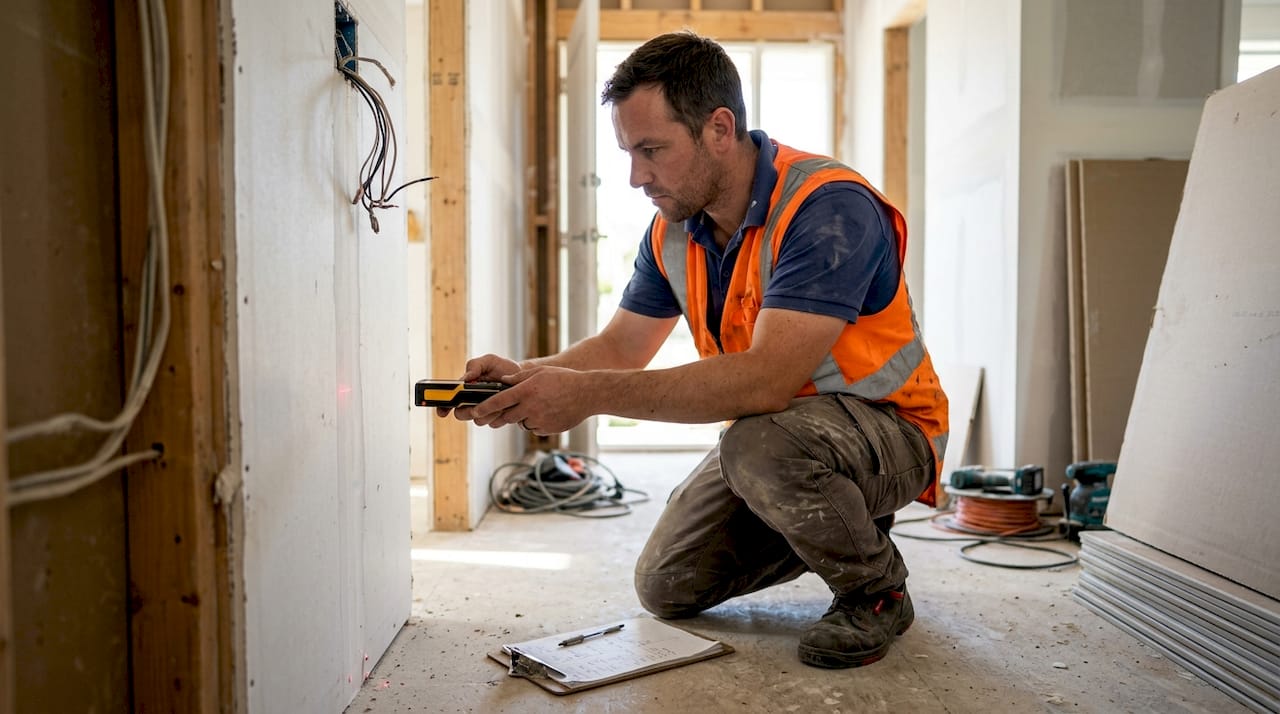
Pro Tip: Request weekly photo documentation of your project showing measurement references and change areas. These images become invaluable when creating or verifying as-built drawings months after construction wraps up.
Quality as-built documentation demands attention to specific details that often get overlooked. Record exact dimensions from permanent reference points, not temporary construction markers. Note material specifications that differ from original plans, including manufacturer details and model numbers. Document elevation changes that affect drainage, accessibility, or flood compliance. Capture utility routing that deviates from designed paths, especially underground or concealed installations. Following essential construction documentation tips helps avoid the common pitfalls that compromise drawing accuracy and usefulness.
Key components and information included in as-built drawings
As-built drawings include structural, electrical, plumbing, and mechanical system details reflecting actual built conditions, providing comprehensive documentation across all building disciplines. Each drawing sheet focuses on specific systems while maintaining coordination with related trades. Understanding what information appears in these documents helps you recognize their value and verify completeness.
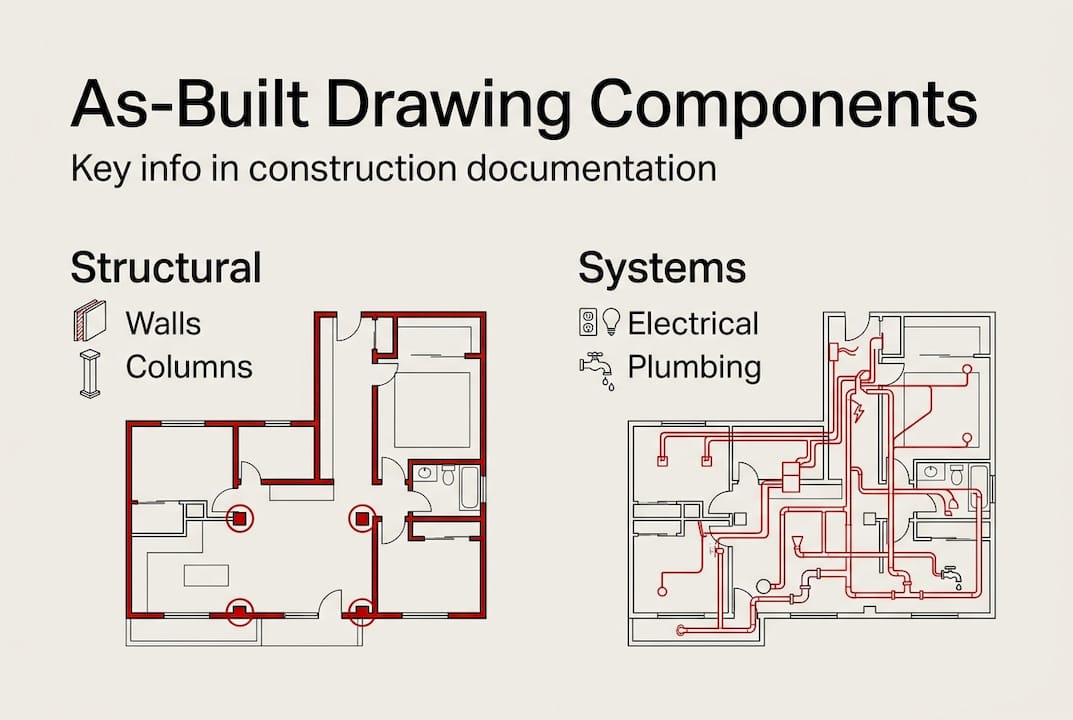
Structural as-built drawings show foundation dimensions, beam locations, column placements, and load-bearing wall configurations exactly as constructed. Any deviations from engineered designs get clearly marked, including reinforcement changes, connection modifications, or material substitutions. These drawings prove critical for future additions or alterations that depend on existing structural capacity and load paths.
Electrical documentation captures panel locations, circuit routing, outlet placements, and lighting fixture positions. Wire sizes, conduit paths, and grounding details appear with actual installation notes. Service entrance specifications, meter locations, and disconnect switch placements provide essential information for upgrades or troubleshooting.
Plumbing as-builts detail pipe sizes, routing paths, fixture locations, and connection types throughout the building. Water supply lines, drain waste vent systems, and gas piping all receive separate notation with material specifications. Clean-out access points, shut-off valve locations, and pressure test results document system integrity.
HVAC drawings illustrate ductwork routing, equipment locations, register placements, and thermostat positions. Refrigerant line paths, condensate drain routing, and equipment specifications support future maintenance and replacement planning. Understanding types of architectural blueprints explained helps you navigate these various drawing types and their specific purposes.
| Discipline | Typical Components | Critical Details |
|---|---|---|
| Structural | Foundations, beams, columns, walls | Load capacities, reinforcement, connections |
| Electrical | Panels, circuits, outlets, fixtures | Wire sizes, voltage, grounding |
| Plumbing | Pipes, fixtures, drains, vents | Pipe materials, sizes, slopes |
| HVAC | Ducts, equipment, registers, controls | Capacities, routing, specifications |
| Civil | Grading, drainage, utilities, paving | Elevations, slopes, materials |
Annotations and revision markers distinguish as-built information from original design intent. Cloud bubbles highlight changed areas. Revision triangles or circles mark specific modification points. Text notes explain why changes occurred and who authorized them. Date stamps track when modifications happened during the construction timeline.
Pro Tip: Request digital copies of your as-built drawings in both PDF and native CAD formats. PDFs work great for quick reference, while CAD files let future engineers or architects incorporate your existing conditions into new design work without redrawing everything from scratch.
How to use as-built drawings for your Florida renovation or construction project
Using accurate as-built drawings helps avoid delays, permits issues, and costly mistakes in renovations and future improvements, transforming these documents from filing cabinet dust collectors into powerful project tools. Smart property owners leverage as-built documentation throughout their ownership journey, not just during initial construction.
Validating construction quality becomes straightforward when you compare completed work against as-built drawings. Walk through your property with drawings in hand, verifying that documented conditions match physical reality. Check outlet locations against electrical plans. Confirm plumbing fixture placements match drawings. Verify HVAC register positions align with ductwork routing shown on mechanical sheets. Discrepancies signal either drawing errors or construction defects requiring investigation.
Permit compliance verification relies heavily on as-built documentation. Building departments compare final inspections against approved plans, but when field changes occurred, as-built drawings provide the bridge. Submit these documents with your certificate of occupancy application to demonstrate code compliance despite modifications. Future permit applications reference existing as-builts to show current conditions before proposed alterations.
| Scenario | With As-Built Drawings | Without As-Built Drawings |
|---|---|---|
| Renovation Planning | Accurate existing conditions speed design and reduce surprises | Guesswork leads to change orders and budget overruns |
| Permit Applications | Quick approvals with documented compliance proof | Delays while inspectors verify undocumented conditions |
| Emergency Repairs | Fast utility shutoffs and access with known locations | Time wasted searching for hidden systems |
| Property Sale | Buyer confidence from transparent documentation | Skepticism about undisclosed modifications |
| Insurance Claims | Clear proof of pre-loss conditions and values | Disputes over coverage and replacement costs |
Reviewing and updating as-built drawings should happen at specific project milestones. Request preliminary as-builts after rough-in inspections to catch major deviations early. Review updated versions before drywall installation to document concealed systems. Obtain final as-builts within 30 days of project completion while details remain fresh. Store these documents with your property deed, insurance policies, and warranty information.
Homeowners and business owners should actively request as-built drawings from contractors and design professionals. Include delivery requirements in your construction contract with specific deadlines and format specifications. Specify both digital and printed copies. Require professional engineer or architect stamps when applicable for Florida projects. Understanding accurate blueprints florida projects helps you recognize quality documentation standards.
Digital storage protects as-built drawings from physical damage while enabling easy sharing with future contractors or buyers. Scan paper drawings at high resolution if you only received printed copies. Store files in multiple locations including cloud services, external drives, and email archives. Share copies with your insurance agent, property manager, and key contractors who might need access during emergencies. Learning how to create architectural drawings provides insight into proper documentation practices and quality standards.
Get professional engineering support for your as-built drawings
Navigating Florida’s complex building codes and documentation requirements becomes significantly easier with experienced engineering support. Professional engineers bring technical expertise and regulatory knowledge that ensures your as-built drawings meet all compliance standards while accurately capturing your project’s construction reality.

Florida Licensed Engineers specializes in comprehensive as-built drawing creation, review, and verification for residential and commercial projects throughout the state. Our team handles architectural, structural, mechanical, electrical, and plumbing documentation with precision that satisfies building departments and supports your future project needs. We understand Florida-specific requirements for flood elevations, wind resistance, and coastal construction that must appear in proper as-built documentation. Whether you need complete drawing sets for a major renovation or verification services for existing documentation, our engineering services overview guide explains how we streamline the process.
Our permit expediting services leverage accurate as-built drawings to accelerate approvals and resolve compliance issues quickly. We coordinate with local building departments across Florida, translating technical documentation into formats inspectors expect and understand. Beyond as-built creation, we provide forensic investigation when discrepancies surface, drainage and grading plans for site work, and flood mitigation analysis including elevation certificates. Explore our complete range of engineering services in florida or review blueprints explained florida to understand how professional documentation protects your investment and simplifies future projects.
Frequently asked questions
How accurate do as-built drawings need to be?
As-built drawings must reflect actual built conditions with precision sufficient for permit verification and future construction planning. Dimensional accuracy within one-quarter inch for critical elements like structural members, utility connections, and code-required clearances represents the professional standard. Less critical elements like finish material transitions can tolerate slightly larger variances. Sloppy or inaccurate drawings create serious problems during renovations when contractors discover that documented conditions don’t match reality, leading to change orders, permit delays, and budget overruns.
Who is responsible for producing as-built drawings in Florida?
Contractors typically bear responsibility for creating as-built drawings as part of their contract closeout obligations, though specific requirements vary by project and contract terms. Licensed engineers or architects often prepare final professional drawings based on contractor field notes and red-line markups. Homeowners and business owners should explicitly include as-built delivery requirements in construction contracts with clear deadlines and format specifications. For projects requiring professional engineer stamps, only Florida-licensed engineers can certify the drawings meet state standards.
Can as-built drawings change after project completion?
As-built drawings can and should be updated when subsequent modifications, additions, or corrections occur after initial project completion. Think of them as living documents that grow with your property’s construction history rather than static snapshots frozen in time. Maintaining current as-built drawings through multiple renovation cycles provides invaluable documentation for future work, emergency repairs, and property sales. Each update should clearly indicate revision dates and mark new changes to preserve the chronological construction record.
How do as-built drawings benefit property resale in Florida?
Accurate as-built drawings significantly enhance property value and buyer confidence by providing transparent documentation of construction quality, permit compliance, and building history. Buyers appreciate knowing exactly what they’re purchasing without hidden surprises lurking behind walls or underground. Properties with comprehensive as-built documentation often command premium prices because they reduce buyer risk and simplify future renovation planning. Florida’s strict building codes and insurance requirements make this documentation especially valuable in coastal areas where flood elevations, wind resistance, and structural integrity directly impact insurability and resale value.
Recommended
- What are architectural plans? Your 2026 Florida guide – Florida Licensed Engineers
- Stamped Drawings: Securing Florida Building Permits – Florida Licensed Engineers
- Blueprints Explained: Transforming Florida Construction – Florida Licensed Engineers
- The Function As-Built Drawings Guide | Expert Engineers


